

-
121 BIOS
['baios] n. shkurtesë nga b asic i nput o utput s ystem ( BIOS) sistemi themelor për hyrje-dalje ( informatikë)What is BIOS?BIOS is an acronym for Basic Input/Output System. It is the boot firmware program on a PC, and controls the computer from the time you start it up until the operating system takes over. When you turn on a PC, the BIOS first conducts a basic hardware check, called a Power-On Self Test (POST), to determine whether all of the attachments are present and working. Then it loads the operating system into your computer's random access memory, or RAM.The BIOS also manages data flow between the computer's operating system and attached devices such as the hard disk, video card, keyboard, mouse, and printer.The BIOS stores the date, the time, and your system configuration information in a battery-powered, non-volatile memory chip, called a CMOS (Complementary Metal Oxide Semiconductor) after its manufacturing process.Although the BIOS is standardized and should rarely require updating, some older BIOS chips may not accommodate new hardware devices. Before the early 1990s, you couldn't update the BIOS without removing and replacing its ROM chip. Contemporary BIOS resides on memory chips such as flash chips or EEPROM (Electrically Erasable Programmable Read-Only Memory), so that you can update the BIOS yourself if necessary.For detailed information about BIOS updates, visit:What is firmware?Firmware consists of programs installed semi-permanently into memory, using various types of programmable ROM chips, such as PROMS, EPROMs, EEPROMs, and flash chips.Firmware is non-volatile, and will remain in memory after you turn the system off.Often, the term firmware is used to refer specifically to boot firmware, which controls a computer from the time that it is turned on until the primary operating system has taken over. Boot firmware's main function is to initialize the hardware and then to boot (load and execute) the primary operating system. On PCs, the boot firmware is usually referred to as the BIOS.What is the difference between memory and disk storage?Memory and disk storage both refer to internal storage space in a computer.The term memory usually means RAM (Random Access Memory). To refer to hard drive storage, the terms disk space or storage are usually used.Typically, computers have much less memory than disk space, because RAM is much more expensive per megabyte than a hard disk. Today, a typical desktop computer might come with 512MB of RAM, and a 40 gigabyte hard disk.Virtual memory is disk space that has been designated to act like RAM.Computers also contain a small amount of ROM, or read-only memory, containing permanent or semi-permanent (firmware) instructions for checking hardware and starting up the computer. On a PC, this is called the BIOS.What is RAM?RAM stands for Random Access Memory. RAM provides space for your computer to read and write data to be accessed by the CPU (central processing unit). When people refer to a computer's memory, they usually mean its RAM.New computers typically come with at least 256 megabytes (MB) of RAM installed, and can be upgraded to 512MB or even a gigabyte or more.If you add more RAM to your computer, you reduce the number of times your CPU must read data from your hard disk. This usually allows your computer to work considerably faster, as RAM is many times faster than a hard disk.RAM is volatile, so data stored in RAM stays there only as long as your computer is running. As soon as you turn the computer off, the data stored in RAM disappears.When you turn your computer on again, your computer's boot firmware (called BIOS on a PC) uses instructions stored semi-permanently in ROM chips to read your operating system and related files from the disk and load them back into RAM.Note: On a PC, different parts of RAM may be more or less easily accessible to programs. For example, cache RAM is made up of very high-speed RAM chips which sit between the CPU and main RAM, storing (i.e., caching) memory accesses by the CPU. Cache RAM helps to alleviate the gap between the speed of a CPU's megahertz rating and the ability of RAM to respond and deliver data. It reduces how often the CPU must wait for data from main memory.What is ROM?ROM is an acronym for Read-Only Memory. It refers to computer memory chips containing permanent or semi-permanent data. Unlike RAM, ROM is non-volatile; even after you turn off your computer, the contents of ROM will remain.Almost every computer comes with a small amount of ROM containing the boot firmware. This consists of a few kilobytes of code that tell the computer what to do when it starts up, e.g., running hardware diagnostics and loading the operating system into RAM. On a PC, the boot firmware is called the BIOS.Originally, ROM was actually read-only. To update the programs in ROM, you had to remove and physically replace your ROM chips. Contemporary versions of ROM allow some limited rewriting, so you can usually upgrade firmware such as the BIOS by using installation software. Rewritable ROM chips include PROMs (programmable read-only memory), EPROMs (erasable read-only memory), EEPROMs (electrically erasable programmable read-only memory), and a common variation of EEPROMs called flash memory.What is an ACPI BIOS?ACPI is an acronym that stands for Advanced Configuration and Power Interface, a power management specification developed by Intel, Microsoft, and Toshiba. ACPI support is built into Windows 98 and later operating systems. ACPI is designed to allow the operating system to control the amount of power provided to each device or peripheral attached to the computer system. This provides much more stable and efficient power management and makes it possible for the operating system to turn off selected devices, such as a monitor or CD-ROM drive, when they are not in use.ACPI should help eliminate computer lockup on entering power saving or sleep mode. This will allow for improved power management, especially in portable computer systems where reducing power consumption is critical for extending battery life. ACPI also allows for the computer to be turned on and off by external devices, so that the touch of a mouse or the press of a key will "wake up" the computer. This new feature of ACPI, called OnNow, allows a computer to enter a sleep mode that uses very little power.In addition to providing power management, ACPI also evolves the existing Plug and Play BIOS (PnP BIOS) to make adding and configuring new hardware devices easier. This includes support for legacy non-PnP devices and improved support for combining older devices with ACPI hardware, allowing both to work in a more efficient manner in the same computer system. The end result of this is to make the BIOS more PnP compatible.What is CMOS?CMOS, short for Complementary Metal Oxide Semiconductor, is a low-power, low-heat semiconductor technology used in contemporary microchips, especially useful for battery-powered devices. The specific technology is explained in detail at:http://searchsmb.techtarget.com/sDefinition/0,,sid44_gci213860,00.htmlMost commonly, though, the term CMOS is used to refer to small battery-powered configuration chips on system boards of personal computers, where the BIOS stores the date, the time, and system configuration details.How do I enter the Setup program in my BIOS?Warning: Your BIOS Setup program is very powerful. An incorrect setting could cause your computer not to boot properly. You should make sure you understand what a setting does before you change it.You can usually run Setup by pressing a special function key or key combination soon after turning on the computer, during its power-on self test (POST), before the operating system loads (or before the operating system's splash screen shows). During POST, the BIOS usually displays a prompt such as:Press F2 to enter SetupMany newer computers display a brief screen, usually black and white, with the computer manufacturer's logo during POST.Entering the designated keystroke will take you into the BIOS Setup. Common keystrokes to enter the BIOS Setup are F1, F2, F10, and Del.On some computers, such as some Gateway or Compaq computers, graphics appear during the POST, and the BIOS information is hidden. You must press Esc to make these graphics disappear. Your monitor will then display the correct keystroke to enter.Note: If you press the key too early or too often, the BIOS may display an error message. To avoid this, wait about five seconds after turning the power on, and then press the key once or twice.What's the difference between BIOS and CMOS?Many people use the terms BIOS (basic input/output system) and CMOS (complementary metal oxide semiconductor) to refer to the same thing. Though they are related, they are distinct and separate components of a computer. The BIOS is the program that starts a computer up, and the CMOS is where the BIOS stores the date, time, and system configuration details it needs to start the computer.The BIOS is a small program that controls the computer from the time it powers on until the time the operating system takes over. The BIOS is firmware, which means it cannot store variable data.CMOS is a type of memory technology, but most people use the term to refer to the chip that stores variable data for startup. A computer's BIOS will initialize and control components like the floppy and hard drive controllers and the computer's hardware clock, but the specific parameters for startup and initializing components are stored in the CMOS. -
122 alternate heliport
A heliport to which a helicopter may proceed when it becomes either impossible or inadvisable to proceed to or to land at the heliport of intended landing. Alternate heliports include the following:Take-off alternate. An alternate heliport at which a helicopter can land should this become necessary shortly after take-off and it is not possible to use the heliport of departure.En-route alternate. A heliport at which a helicopter would be able to land after experiencing an abnormal or emergency condition while en route.Destination alternate. An alternate heliport to which a helicopter may proceed should it become either impossible or inadvisable to land at the heliport of intended landing.Note.─ The heliport from which a flight departs may be an en-route or a destination alternate heliport for that flight.Official definition modified by Amdt 12 to An 6/III (2007).Вертодром, куда может следовать вертолет в том случае, если невозможно или нецелесообразно следовать до вертодрома намеченной посадки или производить на нем посадку. К запасным относятся следующие вертодромы:Запасной вертодром при взлете. Запасной вертодром, на котором вертолет может произвести посадку, если в этом возникает необходимость вскоре после взлета и не представляется возможным использовать вертодром вылета.Запасной вертодром на маршруте. Вертодром, на котором вертолет сможет произвести посадку в том случае, если во время полета по маршруту оно оказалось в нештатной или аварийной обстановке.Запасной вертодром пункта назначения. Запасной аэродром, куда может следовать вертолет в том случае, если невозможно или нецелесообразно производить посадку на вертодроме намеченной посадки.Примечание. Вертодром, с которого производится вылет воздушного судна, также может быть запасным вертодромом на маршруте или запасным вертодромом пункта назначения для данного воздушного судна.International Civil Aviation Vocabulary (English-Russian) > alternate heliport
-
123 soft dollaring
See:Another reason managers are interested in controlling client commissions deserves special attention. "Soft dollaring" has got to be one of the most misunderstood and controversial practices in the money management business. The very term "soft dollars" suggests something shady and conjures up images of money exchanging hands in dark alleyways. Among laymen, soft dollars may be confused with "soft money" political contributions. There is a thin connection between "soft dollars" and "soft money." Since brokerage firms are not subject to the same rules pertaining to political contributions as municipal underwriting firms, large "soft money" contributions from owners of brokerage firms do find their way into politicians' coffers more easily than contributions from underwriters. However, it is important to not confuse the two terms.So what is "soft dollaring?" Soft dollaring is the practice whereby money managers use client brokerage commissions to purchase investment research. When a manager pays for products or services with his own money, directly from the research provider, this is referred to as "hard dollars." Payment with client commissions, financed through a brokerage firm, is referred to as "soft dollars." Through soft dollar arrangements money managers are permitted to shift an expense related to the management of assets they would otherwise have to bear, onto their clients. The amount of this research expense the money management industry transfers onto its clients is in the billions annually. As a result, any analysis of the economics of the money management industry should include the effects of soft dollaring; however, we are unaware of any that has. In the institutional marketplace, strange as it may seem, it is possible for a money manager to profit more from soft dollars than from the negotiated asset management fee he receives.The general rule under the federal and state securities laws is that a fiduciary, the money manager, cannot use client assets for his own benefit or the benefit of other clients. To simplify matters greatly, soft dollaring is a legally prescribed exception to this rule. Congress, the SEC and other regulators have agreed that as long as the research purchased assists the manager in making investment decisions, the clients benefit and its legally acceptable. A tremendous amount of strained analysis has gone into the precise policies and procedures that managers must follow in purchasing research with client commission dollars. Over the years a distinction has been made between "proprietary" research or in-house research distributed to brokerage customers without a price tag attached and "independent third-party" research or research written by a third party and sold to managers at a stated price. Third party research has been most frequently criticized because its cost is separately stated and the benefit to managers most obvious. In this latter case, a breach of fiduciary duty seems most glaring. However, it is well known that proprietary research, offered for "free, " is produced to stimulate sales of dealer inventory. So presumably this research lacks credibility and is less beneficial to clients. There have been distinctions drawn between products and services, such as computers, which are "mixed-use, " i.e., which may serve dual purposes, providing both research and administrative uses. An adviser must make a reasonable allocation of the cost of the product according to its uses, the SEC has said. Some portion must be paid for with "hard" dollars and the other with "soft." There are several articles in our Library of Articles that describe soft dollar practices, rule changes and our proposal to Chairman Levitt to reform the soft dollar business.The issue that soft dollaring raises is: when is it acceptable for a manager to benefit from his client's commissions? For purposes of this article we would like to introduce a new and more useful perspective for pensions in their analysis of soft dollars or any other brokerage issue. That is, all brokerage commissions controlled by managers, benefit managers in some way. Brokerage decision-making by managers rarely, if ever, is simply based upon what firm can execute the trade at the best price. Brokerage is a commodity. Almost all brokerage firms offer reasonably competent, "best execution" services. If they didn't, they'd get sued and soon be out of business. Most savvy brokerage marketers don't even try to differentiate their firms with long-winded explanations about best-execution capabilities. Best execution is a given and impossible to prove. If you want to understand how your money manager allocates brokerage, study his business as a whole, including his marketing and affiliates-not just the investment process.The new English-Russian dictionary of financial markets > soft dollaring
-
124 profit and loss account
Finthe summary record of a company’s sales revenues and expenses over a period, providing a calculation of profits or losses during that time.Abbr. P&LEXAMPLECompanies typically issue P&L reports monthly. It is customary for the reports to include year-to-date figures, as well as corresponding year-earlier figures to allow for comparisons and analysis.There are two P&L formats, multiple-step and single-step. Both follow a standard set of rules known as Generally Accepted Accounting Principles (GAAP). These rules generally adhere to requirements established by governments to track receipts, expenses, and profits for tax purposes. They also allow the financial reports of two different companies to be compared.The multiple-step format is much more common, because it includes a larger number of details and is thus more useful. It deducts costs from revenues in a series of steps, allowing for closer analysis. Revenues appear first, then expenses, each in as much detail as management desires. Sales may be broken down by product line or location, while expenses such as salaries may be broken down into base salaries and commissions.Expenses are then subtracted from revenues to show profit (or loss). A basic multiple-step P&L looks like this:.jpg) P&Ls of public companies may also report income on the basis of earnings per share. For example, if the company issuing this statement had 12,000 shares outstanding, earnings per share would be $5.12, that is, $61,440 divided by 12,000 shares.
P&Ls of public companies may also report income on the basis of earnings per share. For example, if the company issuing this statement had 12,000 shares outstanding, earnings per share would be $5.12, that is, $61,440 divided by 12,000 shares. -
125 profit and loss statement
Finthe summary record of a company’s sales revenues and expenses over a period, providing a calculation of profits or losses during that time.Abbr. P&LEXAMPLECompanies typically issue P&L reports monthly. It is customary for the reports to include year-to-date figures, as well as corresponding year-earlier figures to allow for comparisons and analysis.There are two P&L formats, multiple-step and single-step. Both follow a standard set of rules known as Generally Accepted Accounting Principles (GAAP). These rules generally adhere to requirements established by governments to track receipts, expenses, and profits for tax purposes. They also allow the financial reports of two different companies to be compared.The multiple-step format is much more common, because it includes a larger number of details and is thus more useful. It deducts costs from revenues in a series of steps, allowing for closer analysis. Revenues appear first, then expenses, each in as much detail as management desires. Sales may be broken down by product line or location, while expenses such as salaries may be broken down into base salaries and commissions.Expenses are then subtracted from revenues to show profit (or loss). A basic multiple-step P&L looks like this:P&Ls of public companies may also report income on the basis of earnings per share. For example, if the company issuing this statement had 12,000 shares outstanding, earnings per share would be $5.12, that is, $61,440 divided by 12,000 shares.The ultimate business dictionary > profit and loss statement
-
126 business letter format
бизн. формат делового письма, формат служебного письма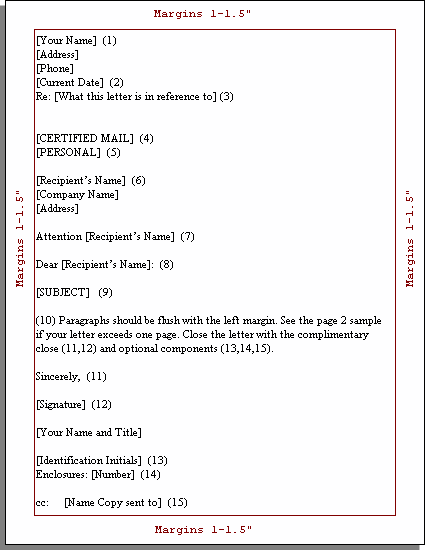 Комментарии к формату (см. рис.)If your stationery includes a letterhead, skip this block. Type your name and address along with other relevant contact information such as e-mail or fax number.If your stationery includes a letterhead, type the date from 2 to 6 lines under the letterhead. Otherwise type it under the return address.Use this block to identify what the letter is in regards to. Examples are: "Re: Invoice 12345" or "Re: Your letter dated January 15, 2010.".Always in caps. Examples include SPECIAL DELIVERY, CERTIFIED MAIL, AIRMAIL, VIA FACSIMILE.Notation on private correspondence if needed such as PERSONAL or CONFIDENTIAL. This goes just above the recipient.Type the name and address of the person and / or company. If you are using an attention line (block 7) then skip the person's name. Address the envelope similarly.Type the name of the personType the recipient's name. Use Mr. or Ms. [Last Name] to show respect, but don't try to guess spelling or gender if you are not sure. Some common salutations are: "Dear [Full Name]:", "To Whom it May Concern:".Type a short description on what the letter is about. If you used a reference line, then you likely do not need a subject line.Type two spaces between sentences.Completing the LetterIt depends on the tone and degree of formality as to what you write here. Can vary from the very formal "Respectfully yours" to the typical "Sincerely" to the friendly "Cordially yours".Leave four blank lines after the Complimentary Close (block 11) to sign your name. Type your name and (optional) title under that signature.If someone else has typed the letter for you, it is common for them to indicate so with initials. Typically it is your initials in upper case followed by the other initials in lower case. For example "BCT/gt". If you typed your own letter, skip this block.If you are including other things with the letter such as brochures, this line tells the reader how many to expect. Common styles include "Enclosures: 3".If you are distributing copies of the letter to others, indicate so using a copies block. the code "cc:" used to indicate carbon copies but now is commonly called courtesy copies.Don't type the brackets. The brackets [ ] in the examples are for narrative purposes only.Try to keep your letters to one page.Use letterhead only for the first page. Just use a blank sheet of paper for continuation pages.You have some freedom in how many blank lines to use between blocks and in the margin sizes in order to fit a letter onto a single page.Not all letters need every block identified in this article. If you leave one out, do not leave blank lines where the blocks would have been.
Англо-русский универсальный дополнительный практический переводческий словарь И. Мостицкого > business letter format
-
127 involve
in'volv1) (to require; to bring as a result: His job involves a lot of travelling.) suponer, implicar2) ((often with in or with) to cause to take part in or to be mixed up in: He has always been involved in/with the theatre; Don't ask my advice - I don't want to be/get involved.) implicar, envolver•- involved- involvement
involve vb1. implicar / enredarI don't mind what you do, as long as you don't involve me no me importa lo que hagas, mientras no me impliques a mí2. suponer / implicartr[ɪn'vɒlv]1 (entail) suponer, implicar, conllevar; (give rise to) acarrear, ocasionar■ what does the job involve? ¿en qué consiste el trabajo?■ this course involves studying abroad esta carrera comprende un período de estudio en el extranjero2 (include, affect, concern) tener que ver con, afectar a■ a police operation involving officers from different countries una operación policial que incluía a oficiales de diferentes países3 (implicar) implicar, involucrar, meter\SMALLIDIOMATIC EXPRESSION/SMALLto involve oneself in something tomar parte en algo1) engage: ocuparworkers involved in construction: trabajadores ocupados con la construcción2) implicate: involucrar, enredar, implicarto be involved in a crime: estar involucrado en un crimen3) concern: concernir, afectar4) connect: conectar, relacionar5) entail, include: suponer, incluir, consistir enwhat does the job involve?: ¿en qué consiste el trabajo?6)to be involved with someone : tener una relación (amorosa) con alguienv.• complicar v.• comprometer v.• concernir v.• encubrir v.• enredar v.• entrañar v.• envolver v.• enzarzar v.• implicar v.• importar v.• interesar v.• involucrar v.• liar v.ɪn'vɑːlv, ɪn'vɒlv1)a) (entail, comprise) suponer*what exactly does your work involve? — ¿en qué consiste exactamente tu trabajo?
b) (affect, concern)where national security is involved... — cuando se trata de la seguridad nacional...
2)to involve somebody IN something/-ING — ( implicate) implicar* or involucrar a alguien en algo; ( allow to participate) darle* participación a alguien en algo
he doesn't involve himself in the day-to-day running of the business — no toma parte en la gestión diaria del negocio
3) involved past pa)to be/get involved IN something — (implicated, associated)
whenever there's an argument, he has to get involved — siempre que hay una pelea, él tiene que meterse
several high-ranking officials were involved in the affair — había varios oficiales de alto rango implicados en el asunto
to be/get involved WITH somebody/something: the people you're involved with la gente con la que andas metido or mezclado; how did you get involved with people like them? — ¿cómo te mezclaste con gente de esa calaña?
b)to be involved IN something — ( engrossed) estar* absorto or enfrascado en algo; ( busy) estar* ocupado con algo
to be/get involved WITH somebody/something — estar* dedicado/dedicarse* a alguien/algo
c) ( emotionally)to be/get involved WITH somebody: she doesn't want to get too involved with him — no quiere llegar a una relación muy seria con él
[ɪn'vɒlv]VT1) (=implicate, associate) implicar, involucrara dispute involving a friend of mine — una disputa en la que estaba implicado or involucrado un amigo mío
we would prefer not to involve the children — preferiríamos no meter or involucrar a los niños
they are trying to involve him in the theft — están intentando implicarlo or involucrarlo en el robo
try to involve him in your leisure activities — intenta hacer que participe contigo en tus actividades de tiempo libre
the persons involved — (gen) los interesados; (=culprits) los implicados
•
to be involved (in sth), how did he come to be involved? — ¿cómo llegó a meterse en esto?he/his car was involved in an accident — él/su coche se vio involucrado en un accidente
she was only involved in the final stages of the project — solo tomó parte en las fases finales del proyecto
I was so involved in my book that... — estaba tan absorto en el libro que...
•
to become or get involved (in sth), the police became involved — la policía tomó cartas en el asunto•
to be/become/get involved with sth/sb, she's so involved with the project she doesn't have time for me — está tan liada * con el proyecto que no tiene tiempo para mí, el proyecto la absorbe tanto que no tiene tiempo para míshe likes him but she doesn't want to get involved — él le gusta, pero no quiere comprometerse
2) (=entail, imply) suponerit involved a lot of expense — supuso or acarreó muchos gastos
there's a good deal of work involved — supone or implica bastante trabajo
what does your job involve? — ¿en qué consiste su trabajo?
how much money is involved? — ¿cuánto dinero hay en juego?
* * *[ɪn'vɑːlv, ɪn'vɒlv]1)a) (entail, comprise) suponer*what exactly does your work involve? — ¿en qué consiste exactamente tu trabajo?
b) (affect, concern)where national security is involved... — cuando se trata de la seguridad nacional...
2)to involve somebody IN something/-ING — ( implicate) implicar* or involucrar a alguien en algo; ( allow to participate) darle* participación a alguien en algo
he doesn't involve himself in the day-to-day running of the business — no toma parte en la gestión diaria del negocio
3) involved past pa)to be/get involved IN something — (implicated, associated)
whenever there's an argument, he has to get involved — siempre que hay una pelea, él tiene que meterse
several high-ranking officials were involved in the affair — había varios oficiales de alto rango implicados en el asunto
to be/get involved WITH somebody/something: the people you're involved with la gente con la que andas metido or mezclado; how did you get involved with people like them? — ¿cómo te mezclaste con gente de esa calaña?
b)to be involved IN something — ( engrossed) estar* absorto or enfrascado en algo; ( busy) estar* ocupado con algo
to be/get involved WITH somebody/something — estar* dedicado/dedicarse* a alguien/algo
c) ( emotionally)to be/get involved WITH somebody: she doesn't want to get too involved with him — no quiere llegar a una relación muy seria con él
-
128 extend
1. transitive verb1) (stretch out) ausstrecken [Arm, Bein, Hand]; ausziehen [Leiter, Teleskop]; ausbreiten [Flügel]extend one's hand to somebody — jemandem die Hand reichen
2) (make longer) (in space) verlängern; ausdehnen [Grenze]; ausbauen [Bahnlinie, Straße]; (in time) verlängern; verlängern lassen [Leihbuch, Visum]extend the time limit — den Termin hinausschieben
3) (enlarge) ausdehnen [Einfluss, Macht]; erweitern [Wissen, Wortschatz, Bedeutung, Freundeskreis, Besitz, Geschäft]; ausbauen, vergrößern [Haus, Geschäft]4) (offer) gewähren, zuteil werden lassen [[Gast]freundschaft, Schutz, Hilfe, Kredit] (to Dat.); (accord) aussprechen [Dank, Einladung, Glückwunsch] (to Dat.); ausrichten [Gruß] (to Dat.)2. intransitive verb* * *[ik'stend]1) (to make longer or larger: He extended his vegetable garden.) ausdehnen2) (to reach or stretch: The school grounds extend as far as this fence.) sich erstrecken4) (to offer: May I extend a welcome to you all?) anbieten•- academic.ru/25901/extension">extension- extensive* * *ex·tend[ɪkˈstend, ekˈ-]I. vt1. (stretch out)▪ to \extend sth etw ausstreckento \extend one's fingers seine Finger ausstreckento \extend one's hand to sb jdm die Hand entgegenstrecken [o geh reichen]to \extend a line/rope eine Leine/ein Seil spannen2. (prolong)▪ to \extend sth credit, visa etw verlängern3. (pull out)▪ to \extend sth etw verlängern; ladder, table etw ausziehen; landing gear etw ausfahren; sofa etw ausklappen4. (expand)▪ to \extend sth etw erweitern [o vergrößern]; influence, business etw ausdehnen [o ausbauen5. (increase)▪ to \extend sth etw vergrößern [o verstärken]to \extend one's commitment seine Bemühungen verstärken, sich akk stärker engagieren6. (build)to \extend one's house sein Haus ausbauento \extend a road/track eine Straße/Fahrspur ausbauen7. (offer)▪ to \extend sth to sb jdm etw erweisen [o zuteilwerden lassen]; credit, protection jdm etw gewähren [o SCHWEIZ a. zusprechen]to \extend one's thanks to sb jdm seinen Dank aussprechento \extend a welcome to sb jdn willkommen heißen8. (strain)▪ to \extend sb jdn [bis an seine Leistungsgrenze] fordernII. vi1. (stretch) sich akk erstrecken, sich akk ausdehnen; over period of time sich akk hinziehen pej, dauernthe fields \extend into the distance die Felder dehnen sich bis in die Ferne ausrain is expected to \extend to all parts of the country by this evening bis heute Abend soll der Regen alle Landesteile erreicht habenthe last party \extended throughout the night die letzte Party dauerte die ganze Nacht2. (include) sich erstreckenhis concern doesn't \extend as far as actually doing something seine Besorgnis geht nicht so weit, dass er tatsächlich etwas unternimmt* * *[ɪk'stend]1. vt1) (= stretch out) arms ausstrecken2) (= prolong) street, line, visit, passport, holidays, deadline, lease verlängernher tender care doubtless extended his life — ihre liebevolle Pflege hat sein Leben zweifellos verlängert
3) (= enlarge) research, powers, franchise ausdehnen, erweitern; knowledge erweitern, vergrößern; influence ausbauen; scheme ausweiten; house anbauen an (+acc); property vergrößern, erweitern; limits erweitern; frontiers of a country ausdehnenin an extended sense of the term — im weiteren Sinne des Wortes
4) (= offer) (to sb jdm) help gewähren; hospitality, friendship erweisen; invitation, thanks, condolences, congratulations aussprechen5) (usu pass = make demands on) person, pupil, athlete fordern2. vi1) (wall, estate, garden) sich erstrecken, sich ausdehnen (to, as far as bis); (ladder, table) sich ausziehen lassen; (meetings etc over period of time) sich ausdehnen or hinziehena career that extended from 1974 to 1990 — eine Laufbahn, die sich von 1974 bis 1990 erstreckte
2)(= reach to)
enthusiasm which extends even to the children — Begeisterung, die sich sogar auf die Kinder überträgt* * *extend [ıkˈstend]A v/t1. (aus)dehnen, (-)weiten2. a) verlängernb) eine Leiter etc ausziehen3. eine Produktionsanlage etc vergrößern, erweitern, ausbauen:extend one’s horizons seinen Horizont erweitern;extend one’s lead SPORT seinen Vorsprung ausbauenround um)5. ausstrecken (one’s hand die Hand)7. fig fort-, weiterführen, einen Besuch, seine Macht ausdehnen (to auf akk), eine Frist, einen Pass, einen Vertrag etc verlängern, WIRTSCH auch prolongieren, ein Angebot etc aufrechterhalten:8. (to, toward[s] dat)b) seinen Dank, Glückwunsch etc aussprechen:extend an invitation to(wards) sb jemandem eine Einladung schicken, jemanden einladenc) einen Gruß entbietena) gerichtlich abschätzenb) pfändenextend o.s. sich völlig ausgeben oder verausgaben13. MIL ausschwärmen lassen14. Buchhaltung: übertragenB v/i1. sich ausdehnen, sich erstrecken, reichen ( alle:over über akk;to bis zu)b) (heraus)ragen4. MIL ausschwärmen* * *1. transitive verb1) (stretch out) ausstrecken [Arm, Bein, Hand]; ausziehen [Leiter, Teleskop]; ausbreiten [Flügel]2) (make longer) (in space) verlängern; ausdehnen [Grenze]; ausbauen [Bahnlinie, Straße]; (in time) verlängern; verlängern lassen [Leihbuch, Visum]3) (enlarge) ausdehnen [Einfluss, Macht]; erweitern [Wissen, Wortschatz, Bedeutung, Freundeskreis, Besitz, Geschäft]; ausbauen, vergrößern [Haus, Geschäft]4) (offer) gewähren, zuteil werden lassen [[Gast]freundschaft, Schutz, Hilfe, Kredit] (to Dat.); (accord) aussprechen [Dank, Einladung, Glückwunsch] (to Dat.); ausrichten [Gruß] (to Dat.)2. intransitive verb* * *v.ausdehnen v.ausfahren (Leiter, Antenne) v.ausweiten v.erweitern v.vergrößern v.verlängern v.
См. также в других словарях:
May Township, Cass County, Minnesota — May Township, Minnesota Township … Wikipedia
May (surname) — For other uses, see May (disambiguation). May Family name Region of origin Germany, England, Ireland Scotland Related names Maye, Mayes, Mays, Meir, Meier May is a surname of Saxon and, independently … Wikipedia
May (name) — For other uses, see May (disambiguation). May Gender Female Origin Word/Name Latin or Arabic Meaning the month of May, Flower Other names … Wikipedia
include — include, comprehend, embrace, involve, imply, subsume are comparable when meaning basically to contain something within as a part or portion of a whole. Include suggests that the thing included forms a constituent, component, or subordinate part… … New Dictionary of Synonyms
May 2003 — May 2003: January – February – March – April – May – June – July – August – September – October – November – December – → Events See also: 2003 invasion of Iraq timeline Progress … Wikipedia
May 2005 — was the fifth month of that year. It began on a Sunday and ended after 31 days, on a Tuesday. May 2005: ← – January – February – March – April – May – June – July – August – September –… … Wikipedia
May 2011 — was the fifth month of the current year. It began on a Sunday and ended after 31 days on a Tuesday. International holidays (See Holidays and observances, on sidebar at right, below) Portal:Current events This is an archived version of Wikipedia s … Wikipedia
May Hill — The River Severn from May Hill Elevation 296 m (971 ft) … Wikipedia
May It Be — Single by Enya from the album The Lord of the Rings: The Fellowship of the Ring Released … Wikipedia
May (film) — May Movie poster for May Directed by Lucky McKee Produced by Marius Balchunas Scott Sturgeo … Wikipedia
May 2006 — was a month with thirty one days. The following events also occurred during the month: Current events of 1 May 2006 (2006 05 01) (Monday) … Wikipedia
